
StorePinger / Mobile App
Your store in your pocket. Every visitor, every sale.
The StorePinger app for Android (iPhone coming soon) tells you the moment someone visits or buys, with their name and city. Live visitors, sales, reports and cart recovery for all your stores, in one app.
Mobile app
Your store in your pocket
Get a notification for every visitor and every sale, see live visitors and today’s numbers, and run cart recovery from your phone.
- Download the APK on your Android phone with the button above.
- Open the file. If Android asks, allow your browser to install unknown apps (Settings → Apps → your browser → Install unknown apps).
- Install and open StorePinger.
- Connect: in WordPress go to StorePinger → Settings → Mobile app and scan the QR code with the app.
The APK is signed by StorePinger and downloads only from storepinger.com. Works on Android 7.0 or newer. The app works with StorePinger Pro and Agency.
Instant notifications
Know the second something happens.
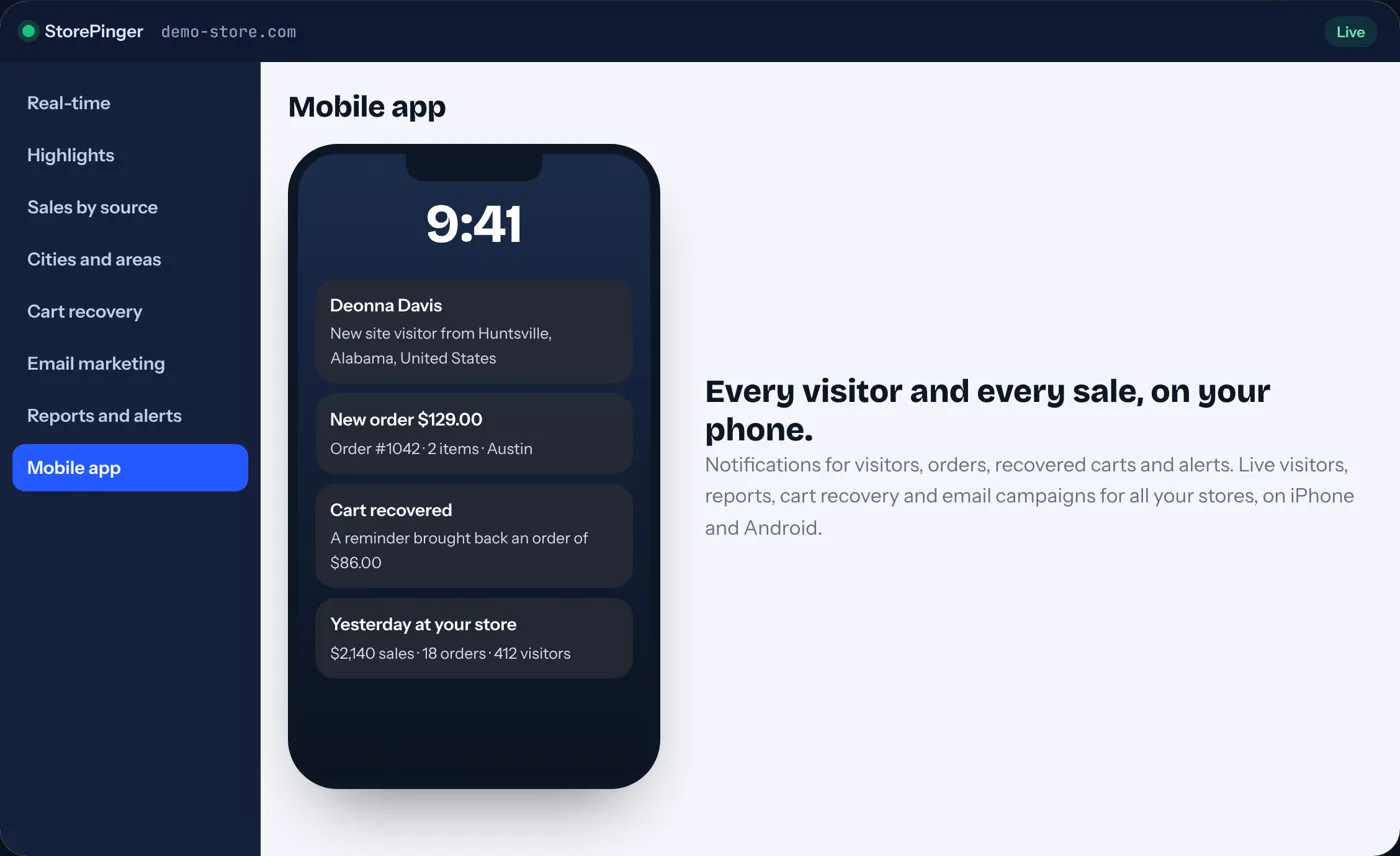
A notification for every new visitor, with the customer’s name when they are logged in or have ordered before, and their city and area. New orders, recovered carts and store alerts arrive the same way.
- New visitors with name and city
- New orders with amount and city
- Low stock on products that are selling
- Traffic drops and checkout problems
Everything from the dashboard
The whole store, not a cut-down view.
Live visitors on a map, today’s sales and orders, every report, the visitor journey of each shopper, cart recovery and payment links. New features you get in the plugin show up in the app by themselves.
- Live visitors and activity
- All reports with date ranges
- Send cart reminders and payment links
- Run and pause email campaigns
Made for owners
Small touches that matter.
Add all your stores and switch with one tap. Put a widget on your home screen to see live visitors without opening the app. Lock the app with your fingerprint.
- Many stores in one app
- Home screen widget
- Fingerprint or phone PIN lock
- Connect in seconds with a QR code
Without it
You can’t sit in front of a dashboard all day.
Most store owners check their phone dozens of times a day, but have to open a laptop to see how the store is doing.
Problems found too late
A failed payment or sold-out best seller is only useful to know about while you can still fix it.
No feel for the store
Seeing visitors and orders arrive through the day helps you notice what campaigns and posts actually do.
Many stores, many logins
Owners with several stores, and agencies, waste time switching between dashboards.
Learn
Getting the most from store notifications
Choose what matters
Turn on orders and alerts first. Add visitor notifications if you enjoy seeing every visit.
Set a daily goal
A goal turns a number into a target and makes good days easy to spot.
Read the morning report
One notification with yesterday’s sales, orders and visitors is the simplest daily habit.
FAQ
Questions store owners ask
Does the app work for several stores?
Yes. Add as many stores as you like and switch between them with one tap. Notifications show which store they are from.
Is there a StorePinger app for iPhone and Android?
The Android app is ready: download the APK from this page. The Google Play and App Store versions are coming soon. The app connects to your store with a QR code from your WordPress settings.
Will I get a notification for every visitor?
Yes, if you want. You choose which notifications you get: visitors, orders, carts, alerts, the morning report and your daily goal.
Does the app show customer names?
Logged-in customers and people who ordered before appear by name, unless you hide customer names in your settings. Everyone else appears as a visitor number with their city.
What does the app cost?
The app is free to download and works with StorePinger Pro and Agency. It shows the same data your plan includes in the plugin.
Feel every sale, wherever you are.
Install StorePinger, connect the app and get your first notification today.